Usage Window Starter activates your next Claude and Codex session the minute the old one resets
A small macOS menu bar app that watches the 5-hour usage limits of Claude Code and Codex and sends one short message to start the next session as soon as the old one resets.
Usage Window Starter is a macOS menu bar app for people who use Claude Code or Codex on a subscription. Both have a 5-hour usage limit, and the 5 hours only start counting when you send your first message. Usage Window Starter watches both limits and, as soon as a session resets, sends one short message to start the next one.
Update, 26 September: version 0.3 moved the app from Bun to Go, which took the download from 23 MB to 4.4 MB. It also added a panel under the menu bar icon and automatic updates, and you can now download it instead of building it yourself.
Why
If your session resets at 14:47 and you only get back to work at 16:30, your new session runs until 21:30. The time in between isn't used, so a long day ends up with fewer sessions than it could have had. Starting the next session right away fixes that. It costs one "Reply with just: ok" message per session.
No API calls
The easiest way to read usage limits is to call the endpoints the official apps use, with the OAuth token from your keychain. I didn't want to do that. Those endpoints aren't meant for third-party tools, and I'd rather not risk my subscription account on it.
So the app only talks to the official CLIs, headless, with your normal login:
| Limit check (no model call) | Starting a session | |
|---|---|---|
| Claude | claude -p "/usage" | claude -p … --model haiku |
| Codex | codex app-server → account/rateLimits/read | codex exec -m <model> |
/usage in print mode is a local command that doesn't query a model, and the Codex app server has a proper JSON-RPC method for rate limits. Neither touches your Claude or Codex configuration.
Two things I learned about the limits
Codex reports a session even when none is running. When no Codex session is running, account/rateLimits/read doesn't say "none". It reports 0% used with a reset exactly five hours from the moment you ask, and that time moves forward on every read. My first version took that at face value, decided a session was running, and never started one. Now 0% with a reset exactly five hours away counts as idle.
Claude seems to round session start times down to the hour. A session I started at 17:07 reset at 22:00, not 22:07. So for Claude, a few minutes of delay doesn't cost anything, as long as the new session starts within the same hour. Codex doesn't round: a session started at 15:06:19 reset at exactly 20:06:19.
Checking at the right time
The app checks every 10 minutes, which is modest: each check is one request, the same one you make by typing /usage. It also checks once more right after each session's reported reset time: 30 seconds after for Codex, and 90 seconds for Claude, because /usage only shows minutes. With that, today's Codex reset looked like this in the log:
20:06:19  old session resets
20:06:49  reset check → idle
20:06:53  start message sent
The app
It's built on Electrobun with a Go backend, and the panel and settings window are plain HTML and CSS in the system WebKit. The menu bar shows a countdown for each session, like C 4:30 · X 2:18. Clicking it opens a panel with each session's usage and time left, your weekly usage, and a Start button when a session is idle.
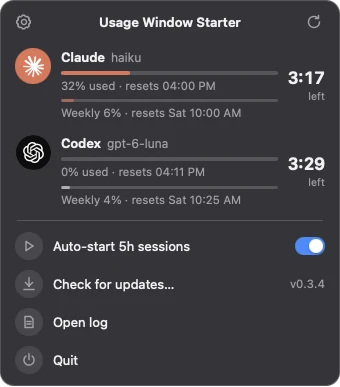
In Settings you can pick the models, pause auto-start, limit it to certain hours, and send a test message to check that a model still works.
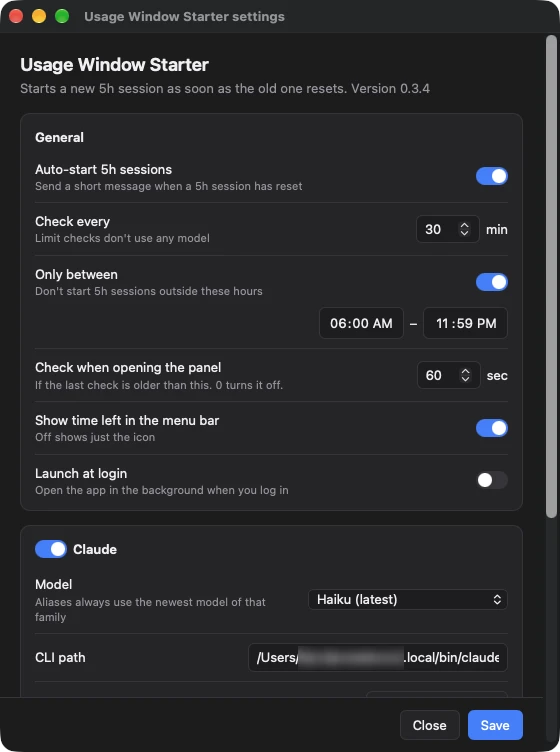
The Codex model list comes from your installed Codex, so when a model is retired, Settings flags it and you get a notification on the first failed start. For Claude, the haiku, sonnet and opus aliases always point at the newest model.
The first version was a 23 MB download, almost all of it the Bun runtime. Electrobun can also run a Go main process, but its Go SDK has no menus for menu bar icons, so I waited until the panel replaced the menu. Then I ported the backend to Go. The download is now 4.4 MB, and with the panel closed the app uses about 30 MB of memory.
Try it
Download the DMG from the latest release and drag the app to Applications. It isn't signed or notarized yet, so macOS will probably say it's damaged the first time. Run this once in Terminal to allow it:
xattr -dr com.apple.quarantine "/Applications/Usage Window Starter.app"
Then open it and turn on Launch at login in Settings. New versions install from the panel.
It's MIT licensed.