Overview
Claude Code and Codex subscriptions have a 5-hour usage limit, and the 5 hours only start counting when you send your first message. If the old session resets at 14:47 and you get back to work at 16:30, the new session runs until 21:30, and the time between 14:47 and 16:30 is lost.
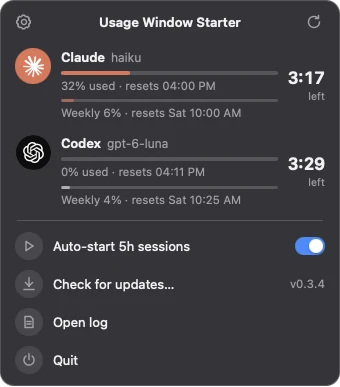
Usage Window Starter sits in the menu bar and watches both limits. As soon as a session resets, it sends one short message to start the next one, so a new session is always running.
What it does
- Countdowns in the menu bar:
C 4:30 · X 2:18is the time left in the Claude and Codex sessions.–means a session is idle or it's outside your active hours, and!means something went wrong. You can also turn the times off and keep just the icon. - A panel with the details: click the icon to see each session's usage and time left, your weekly usage, and a Start button when a session is idle.
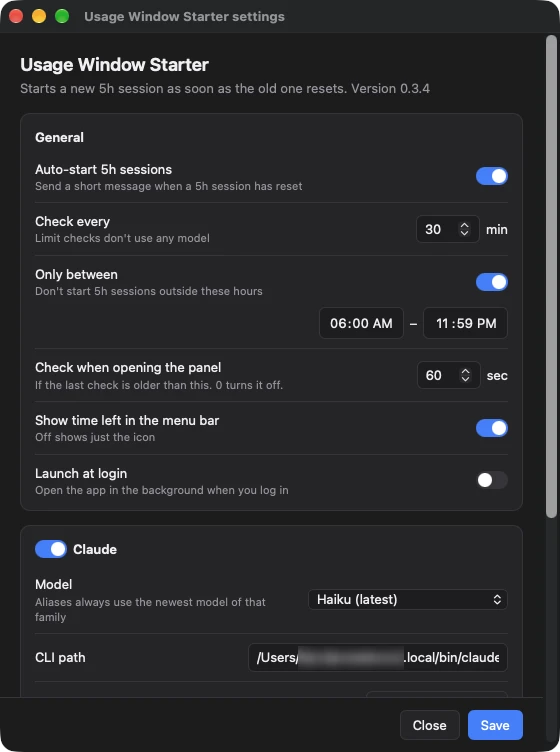
- Starts a new session right after a reset: it checks on a regular interval, plus once more just after each session's reset time. In practice the next session starts less than a minute after the reset.
- Active hours: it can stay quiet at night. When your hours begin, it checks right away, so both sessions start together.
- Official CLIs only: it checks limits with
claude -p "/usage"and the Codex app server, and sends messages with headlessclaude -pandcodex exec. There are no direct API calls, and it never reads your tokens. - Your choice of model: the Codex list comes from your installed Codex, so it keeps up with Codex updates. For Claude, the
haiku,sonnetandopusaliases always use the newest model of that family. - Updates itself: it checks GitHub for a new version once a day, downloads it in the background, and installs it when you click Install in the panel.
Install
Download the DMG from the latest release, open it, and drag the app to Applications. The app isn't signed or notarized yet, so macOS will probably refuse to open it the first time and say it's damaged. To allow it, run this in Terminal once:
xattr -dr com.apple.quarantine "/Applications/Usage Window Starter.app"
Then open it and turn on Launch at login in Settings. Later versions install from the panel.
You need Claude Code and/or Codex installed and logged in with a subscription.
Built with
A Go backend on Electrobun. The panel and settings window are plain HTML, CSS and TypeScript in the system WebKit, so there's no bundled Chromium, and the whole app is a 4.4 MB download.