codex-img 0.5.0 turns generated images into game sprites
Trim, resize and hard-edged alpha in the same command that generates the image, a fix for the dark colour hidden under transparent pixels, and a trim bug that only showed up on real art.
codex-img 0.5.0 is out, together with 0.4.0 from earlier today. Both releases come from one project: I used codex-img to make the art for a small racing game, with Claude Code writing the prompts and running the tool.
Generating went well. Every image was usable on the first try, and editing with a reference image (-i) let me change one part of a picture without touching the rest. The work came after generating: every sprite needed cropping to its visible content, resizing, and cleaning up, and that happened in a separate Python script. These two releases move that script into codex-img.
One command, from prompt to sprite
codex-img - -b transparent --hard-alpha --trim=4 --resize 400x300 --no-enlarge -c 160 -o kart.png <<'EOF'
Game asset sprite for a retro racing game: a small red go-kart with a driver
in a white helmet and blue suit, seen from the side... 16-bit arcade pixel art...
Isolated on a transparent background, no ground, no shadow, no text.
EOF
This took 29 seconds. The backend returned a 1536x1024 PNG of 1.1 MB, and codex-img saved this 400x215 sprite of 13.7 KB:
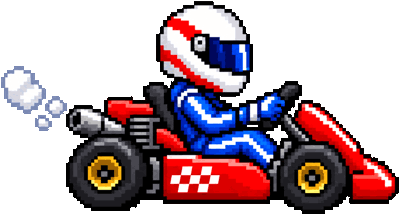
It also kept the untouched original as kart.raw.png. The quota for it is already spent, and the backend has no seed, so an image can't be generated again exactly. --json reports both files, the size of each, and where the crop sat in the original, so a game can keep a sprite's anchor point.
What's hidden under the transparent pixels
A transparent pixel has an alpha of 0, but it still stores a colour, and nothing shows it. Generated images store a dark vignette with coloured glows there. On the left is the raw kart as it looks; on the right is the same file with the alpha channel ignored:
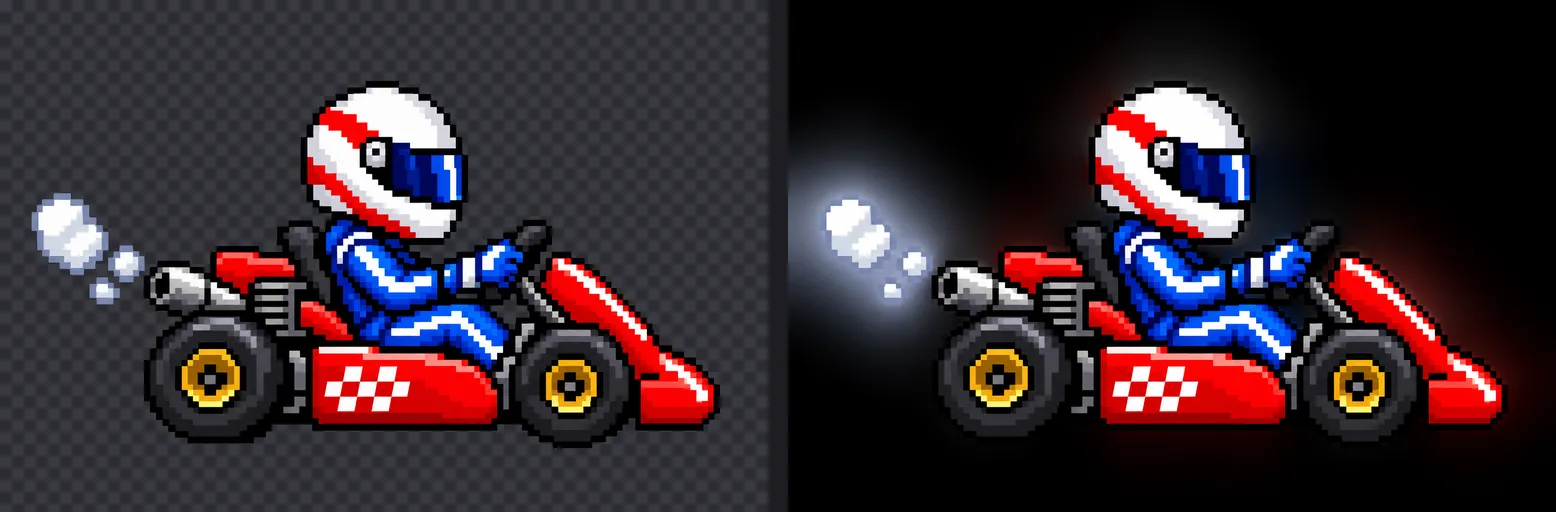
It stays invisible until something resizes or filters the image without taking alpha into account. Then the hidden colour mixes into the edge pixels and the sprite gets a dark outline. Game engines do exactly this kind of filtering when they draw a scaled texture.
Setting those pixels to transparent black doesn't help, because black is also a colour that bleeds in. codex-img handles it in two places. Its own resize works with premultiplied alpha, so a transparent pixel contributes nothing, whatever colour it stores. And PNG output gets the colour of the nearest visible pixel written under every fully transparent one, which is what texture tools call edge bleed. On a test sprite, a plain downscale afterwards left its edge colour intact (a green channel of 200, as in the sprite) with bleed, and dragged it down to 50 without. As a side effect, the file shrank from 58 KB to 6 KB, because the hidden glows compress badly.
The trim bug that only real art found
--trim crops an image to its visible pixels. In 0.4.0, visible meant an alpha above 0. My test images had clean alpha, so it worked, but when I ran it on the game's actual art, it barely cropped anything. Generated images scatter faint specks, with an alpha of 1 to 16, all over the transparent background. Here they are in yellow on the kart:
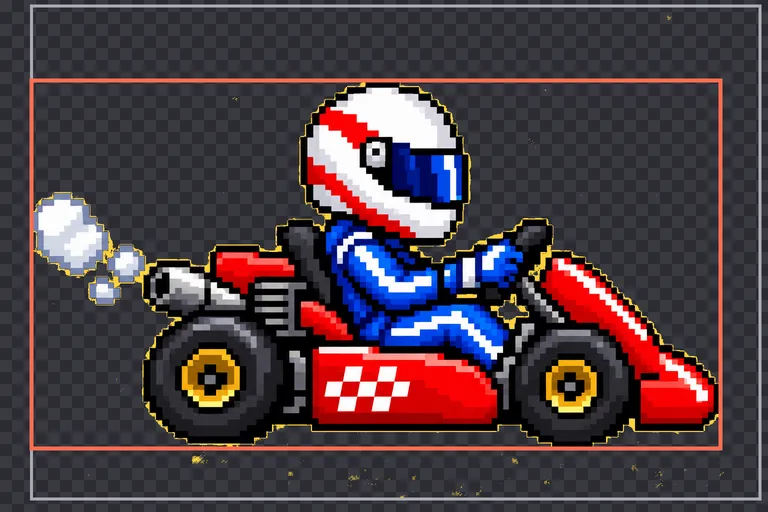
The grey box is the 0.4.0 crop, stretched out to reach the specks. On one of the game's sprites, a row of tyres, it came out at more than twice the area it should have. 0.5.0 ignores alpha of 16 or less when trimming, which gives the red box, and matches the game script's crops on every sprite I checked.
Hard edges for pixel art
Looking at that art more closely showed something else: the backend never returns a fully solid pixel. The body of a sprite comes back at an alpha of 250 to 254, so it's very slightly see-through, and the edges fade out softly. That doesn't suit pixel art, and the game script made every pixel either fully solid or fully transparent.
--hard-alpha does the same. Every pixel with an alpha above 16 becomes solid, and the rest becomes transparent. It runs again after resizing, because resampling softens edges, and palette reduction (-c) keeps the result hard. For art with soft edges, like a glow or a painted style, leave it off.
Sizes
--resize takes 400x, x300 or 400x300. With both sides given, --fit decides what happens when the aspect ratio differs: inside fits the image in the box, cover fills the box and crops the centre, contain pads with transparency, and fill stretches. cover also solves a problem from the first post: -s 1536x1024 is only a hint, and it has come back as 1672x941. --resize 1536x1024 --fit cover gives exactly 1536x1024.
--no-enlarge makes --resize a maximum: an image that's already smaller keeps its size instead of being scaled up.
All of this works both when generating and in codex-img convert, which uses no login and no quota:
codex-img convert raw/car.png --hard-alpha --trim --resize 400x300 --no-enlarge -c 160 -o assets/
Replacing the script
As a check, I rebuilt all 35 of the game's assets from the raw images with codex-img instead of the Python script: sprites with the command above, the full-screen cockpit overlay with --fit fill, and the sky backgrounds as WebP. All 35 came out at exactly the script's dimensions. The files are about 11% bigger in total, because codex-img uses a different colour quantizer. The one step that stays in Python is specific to the game: finding the screen inside the cockpit image, so the answer buttons can go there.
Try it
Download the binary for macOS or Linux from the release page, and log in once with codex login using your ChatGPT account. The Agent Skill in the repository now tells Claude Code and Codex when to use these options, including to compare a sprite with the project's existing art before choosing --hard-alpha.